> ## Documentation Index
> Fetch the complete documentation index at: https://mw-docs.middleware.io/llms.txt
> Use this file to discover all available pages before exploring further.
# Oracle
> Oracle Integration - Setup & Installation Docs | Middleware
The Oracle Database Integration provides real-time visibility into the performance of your Oracle database system. This integration is useful for monitoring database instances, CPU utilization, transactions, and other Oracle-specific metrics.
For more information on the Oracle Integration, navigate to the [Oracle Demo Project Repository](https://github.com/middleware-labs/integration-demo-projects/tree/master/oracledb).
# Prerequisites
Infrastructure Agent (Infra Agent) `v1.6.1+`. To install the Infra Agent, see our [Installation Guide](https://docs.middleware.io/agent-installation/overview)
`Oracle Server v10.2+`
# Setup
### Step 1: Grant Permissions
Assign permissions according to the database user:
```sql SQL theme={null}
GRANT SELECT ON V_$SESSION TO ;
GRANT SELECT ON V_$SYSSTAT TO ;
GRANT SELECT ON V_$RESOURCE_LIMIT TO ;
GRANT SELECT ON DBA_TABLESPACES TO ;
GRANT SELECT ON DBA_DATA_FILES TO ;
GRANT SELECT ON DBA_TABLESPACE_USAGE_METRICS TO ;
```
### Step 2: Access Integrations
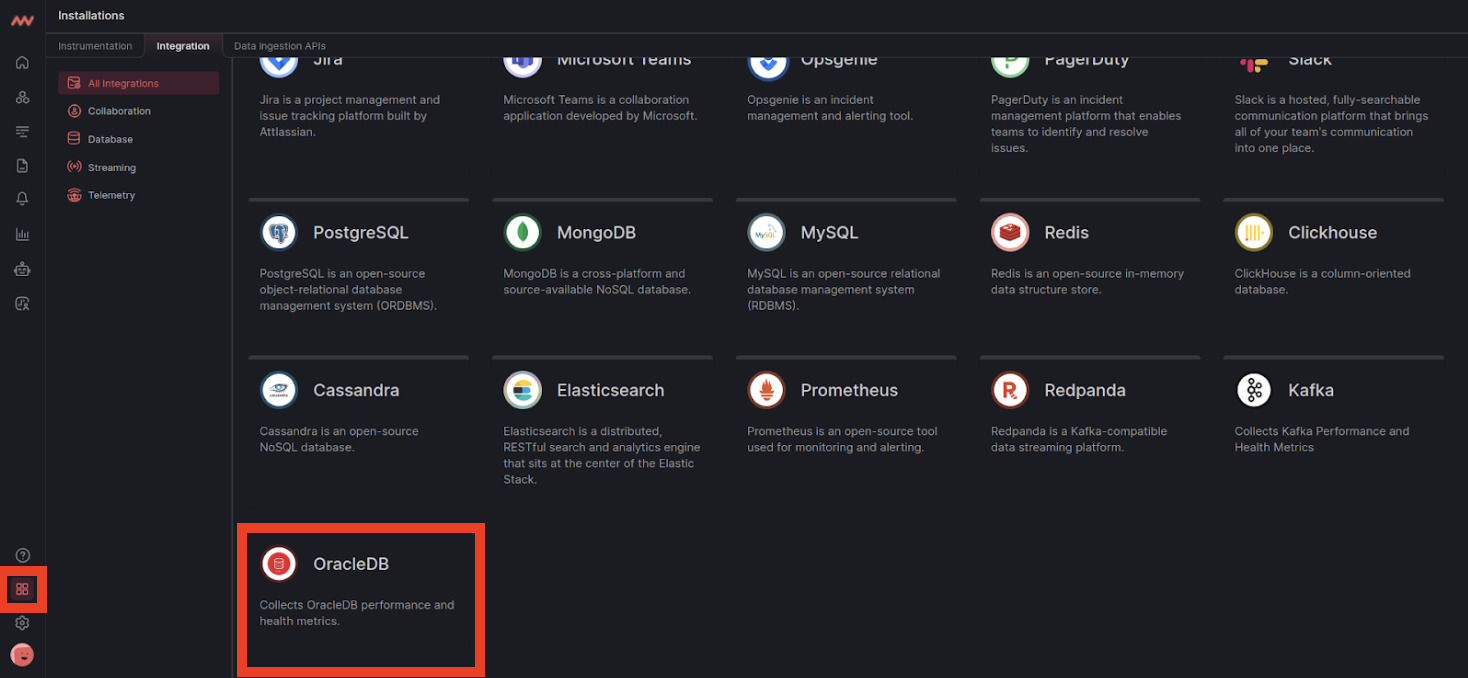
Log in to Middleware, navigate to the Installations Page in the bottom left corner, select integrations and click Oracle:
### Step 3: Enable Oracle Integration
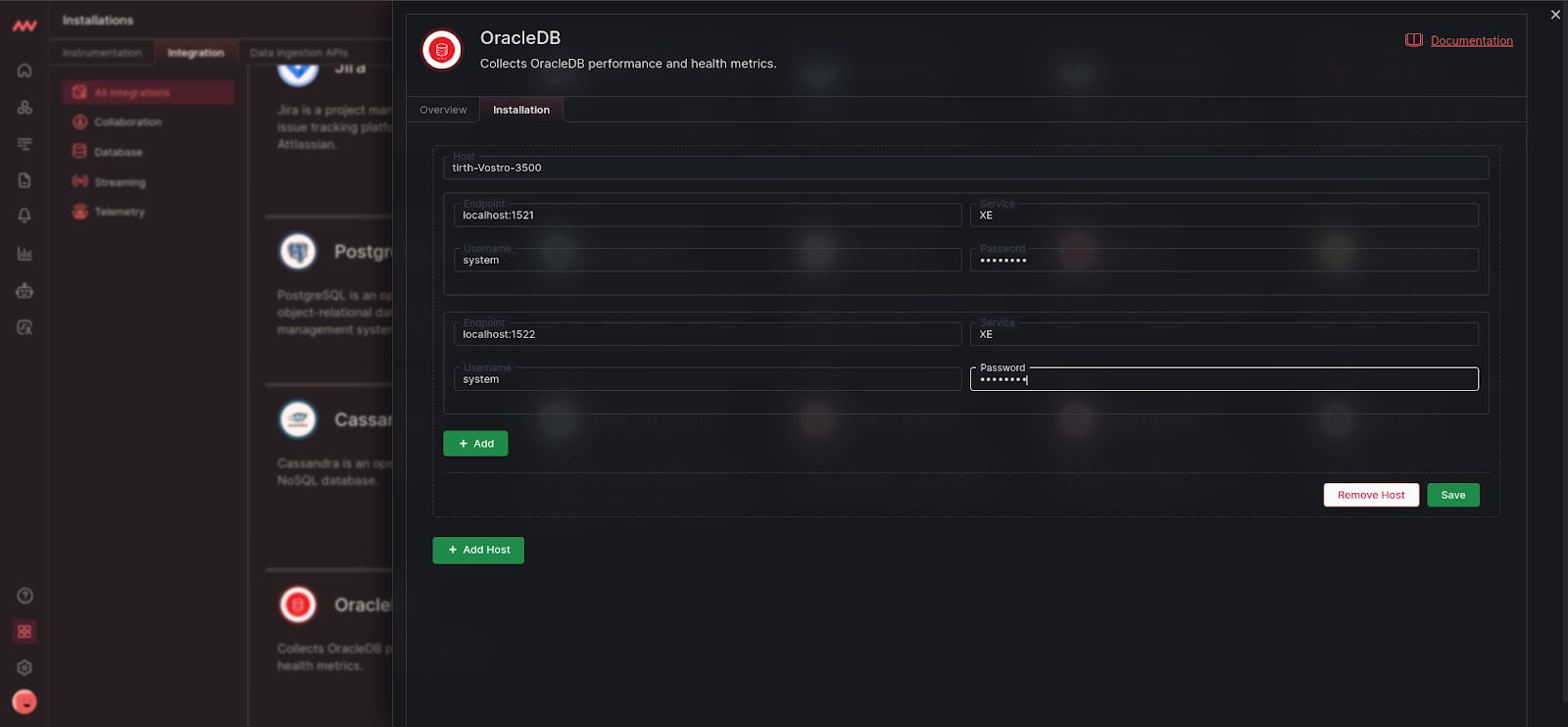
Click on **Add Host** and fill out your Oracle configuration details:
Navigate to the [Host Configuration](/integrations/oracledb-integration#host-configuration) to learn more about the below input fields.
# Visualize Your Data
### Default Oracle Dashboard
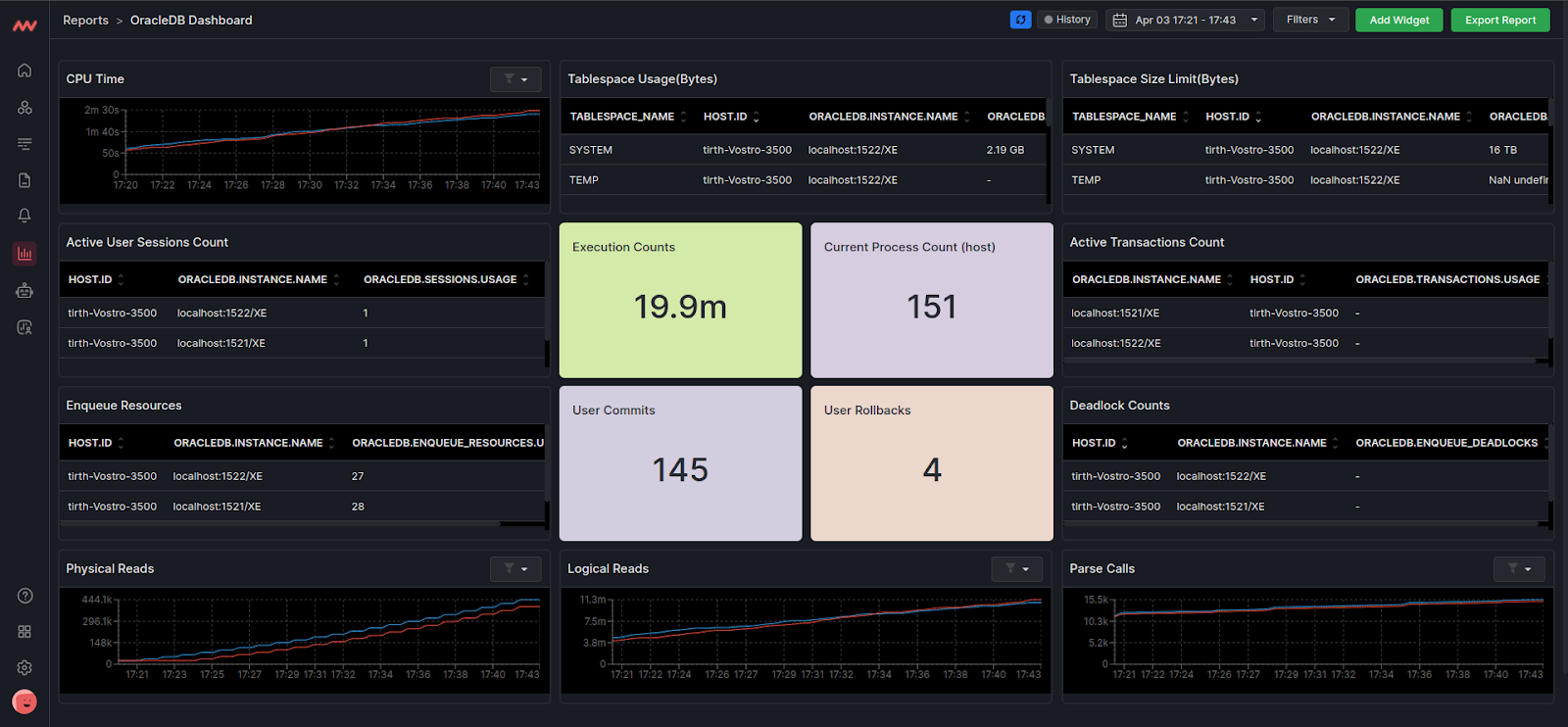
Quickly access your Oracle data with Middleware’s default Oracle Dashboard. Navigate to the Dashboard Builder and select the **Oracle Dashboard**:
### Create Oracle Widget
Create your own widget from scratch. Navigate to the Dashboard Builder and select the dashboard you would like to create a widget in. Select Add New Widget and choose the Oracle data source.
# Metrics Collected
| **Metric** | **Description** |
| :--------------------------------- | :------------------------------------------------------------------------------------------------------- |
| `oracledb.cpu_time` | Cumulative CPU time (in seconds) |
| `oracledb.enqueue_deadlocks` | Total number of deadlocks between table or row locks in different sessions |
| `oracledb.exchange_deadlocks` | Number of times that a process detected a potential deadlock when exchanging two buffers |
| `oracledb.executions` | Total number of calls (user and recursive) that executed SQL statements |
| `oracledb.logical_reads` | Number of logical reads |
| `oracledb.hard_parses` | Number of hard parses |
| `oracledb.parse_calls` | Total number of parse calls |
| `oracledb.pga_memory` | Session PGA (Program Global Area) memory |
| `oracledb.physical_reads` | Number of physical reads |
| `oracledb.user_commits` | Number of user commits |
| `oracledb.user_rollbacks` | Number of times users manually issue a ROLLBACK statement or an error occurs during a user's transaction |
| `oracledb.sessions.usage` | Count of active sessions |
| `oracledb.processes.usage` | Current count of active processes |
| `oracledb.processes.limit` | Maximum limit of active processes, `-1` if unlimited |
| `oracledb.sessions.limit` | Maximum limit of active sessions, `-1` if unlimited |
| `oracledb.enqueue_locks.usage` | Current count of active enqueue locks |
| `oracledb.enqueue_locks.limit` | Maximum limit of active enqueue locks, `-1` if unlimited |
| `oracledb.dml_locks.usage` | Current count of active DML (Data Manipulation Language) locks |
| `oracledb.dml_locks.limit` | Maximum limit of active DML (Data Manipulation Language) locks, `-1` if unlimited |
| `oracledb.enqueue_resources.usage` | Current count of active enqueue resources |
| `oracledb.enqueue_resources.limit` | Maximum limit of active enqueue resources, `-1` if unlimited |
| `oracledb.transactions.usage` | Current count of active transactions |
| `oracledb.transactions.limit` | Maximum limit of active transactions, `-1` if unlimited |
| `oracledb.tablespace_size.limit` | Maximum size of tablespace in bytes, `-1` if unlimited |
| `oracledb.tablespace_size.usage` | Used tablespace in bytes |
| `oracledb.db_block_gets` | Number of times a current block was requested from the buffer cache (Disabled) |
| `oracledb.consistent_gets` | Number of times a consistent read was requested for a block from the buffer cache (Disabled) |
# Host Configuration
| **Input Field** | **Description** |
| :-------------- | :---------------------------------------------------------------------------------- |
| `endpoint` | Endpoint used to connect to the Oracle server. Must be in the format of `host:port` |
| `password` | Password for the Oracle connection (special characters are allowed) |
| `service` | Oracle Service that the receiver connects to |
| `username` | Username for the Oracle connection |
# Next Steps
* [How to Create Alerts](https://docs.middleware.io/workflow/alerting/setup-alert)
* [Dashboard Basics & Customization](https://docs.middleware.io/workflow/custom-dashboard/dashboard-builder-overview)
* [Custom Telemetry Ingestion](https://docs.middleware.io/open-telemetry/otel-getting-started)
* [Getting Started With Real User Monitoring (RUM)](https://docs.middleware.io/rum/rum-overview)
* [Data Ingestion APIs](https://docs.middleware.io/data-ingestion-apis/opentelemetry-metrics)
Need assistance or want to learn more about Middleware? Contact us at support\[at]middleware.io.