
Prerequisites
Middleware Host Agent (MW Agent) must be installed on your local machine. To install the MW Agent, see our Installation Guide.Setup
Step 1: Update ClickHouse Configuration
Add the following lines to your ClickHouse configuration (/etc/clickhouse-server/config.xml) to expose metrics on port 9126:
XML
<prometheus>
    <endpoint>/metrics</endpoint>
    <port>9126</port>
    <metrics>true</metrics>
    <events>true</events>
    <asynchronous_metrics>true</asynchronous_metrics>
</prometheus>
Step 2: Navigate to ClickHouse Integration
Login to your Middleware account, navigate to the ClickHouse integration, and connect ClickHouse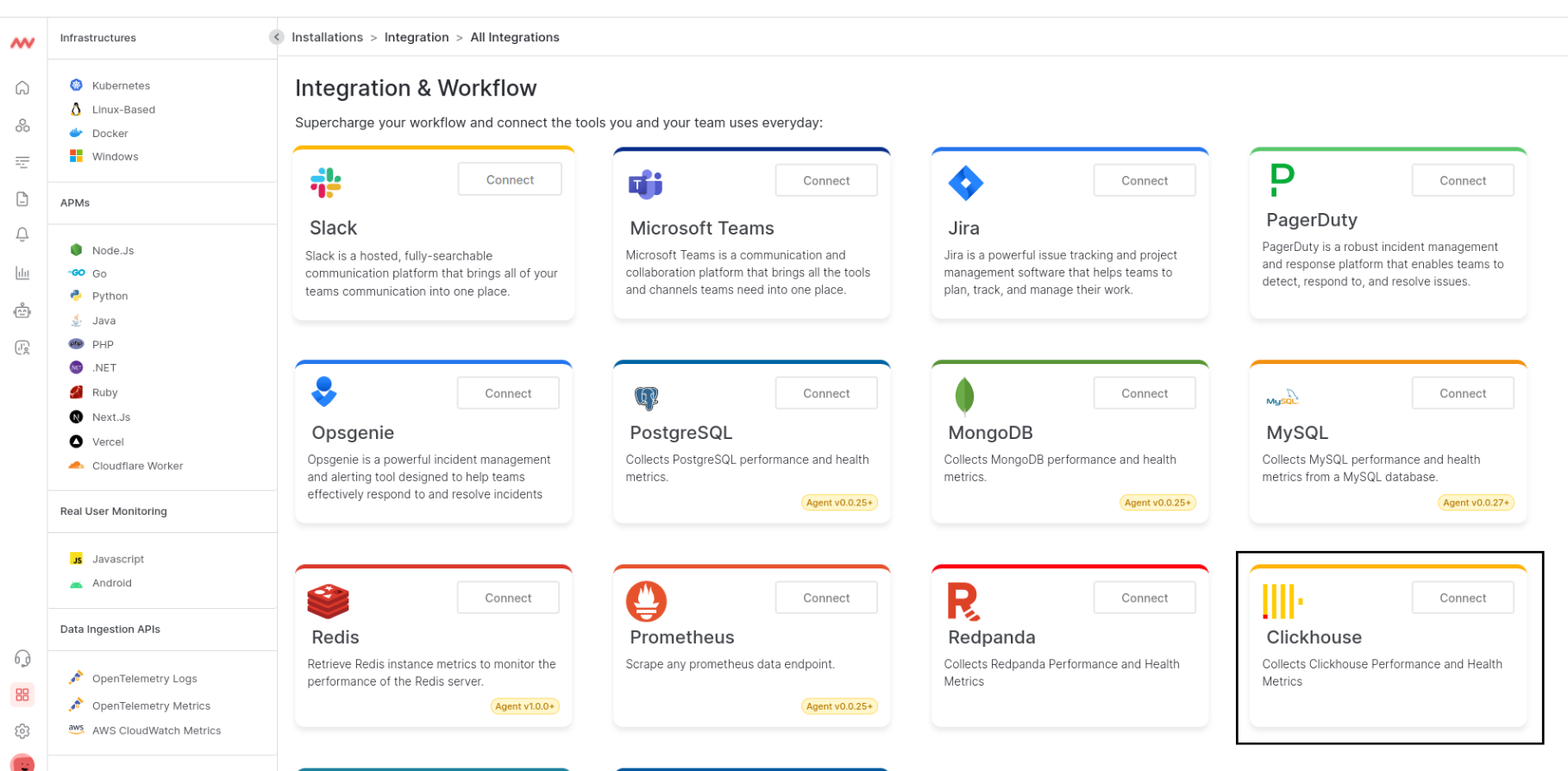
Step 3: Connect ClickHouse Instance
To access ClickHouse metrics, choose a host to connect to your ClickHouse instance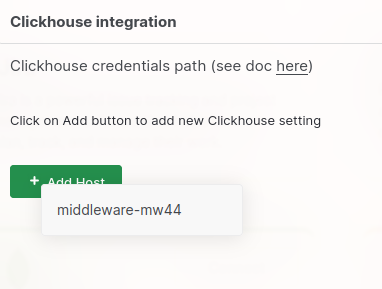
Step 4: Configure ClickHouse Instance
Configure your host to connect to the IP address and port that ClickHouse stores its metrics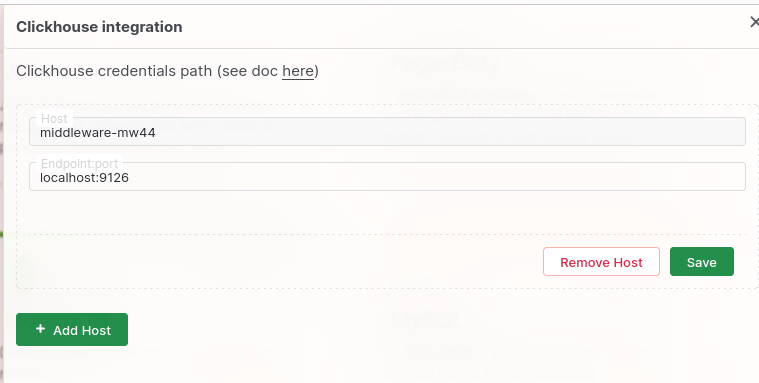
The default port for your ClickHouse instance is
9126 Visualize Your Data
Default ClickHouse Dashboard
Quickly access your ClickHouse data with Middleware’s default ClickHouse dashboard. Navigate to the Dashboard Builder and select the ClickHouse - Metrics (Runtime) Dashboard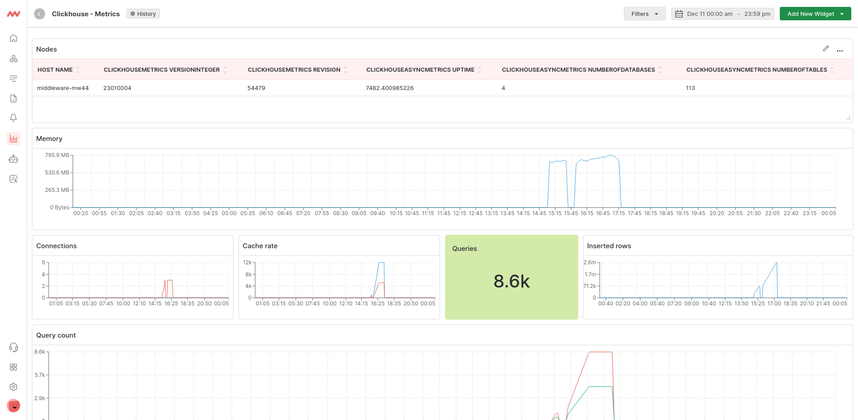
Create ClickHouse Widgets
Create your own widget from scratch. Navigate to the Dashboard Builder and select the dashboard you would like to create a widget in. Select Add New Widget and choose the ClickHouse data source.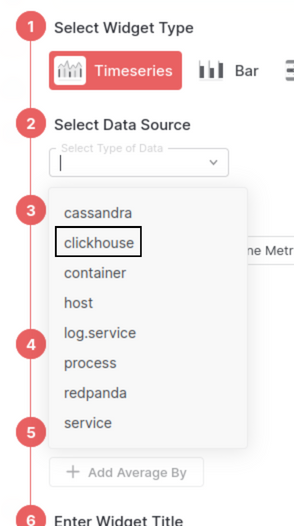
Learn more about creating your own widgets and dashboards in the Dashboard Builder section.
Metrics Collected
| Metric | Description |
|---|---|
AggregatorThreads | Number of threads in the Aggregator thread pool. |
AggregatorThreadsActive | Number of threads in the Aggregator thread pool running a task. |
TablesLoaderForegroundThreads | Number of threads in the async loader foreground thread pool. |
TablesLoaderForegroundThreadsActive | Number of threads in the async loader foreground thread pool running a task. |
TablesLoaderBackgroundThreads | Number of threads in the async loader background thread pool. |
TablesLoaderBackgroundThreadsActive | Number of threads in the async loader background thread pool running a task. |
AsyncInsertCacheSize | Number of async insert hash id in cache |
AsynchronousInsertThreads | Number of threads in the AsynchronousInsert thread pool. |
AsynchronousInsertThreadsActive | Number of threads in the AsynchronousInsert thread pool running a task. |
AsynchronousReadWait | Number of threads waiting for asynchronous read. |
BackgroundBufferFlushSchedulePoolSize | Limit on number of tasks in BackgroundBufferFlushSchedulePool |
BackgroundBufferFlushSchedulePoolTask | Number of active tasks in BackgroundBufferFlushSchedulePool. This pool is used for periodic Buffer flushes |
BackgroundCommonPoolSize | Limit on number of tasks in an associated background pool |
BackgroundCommonPoolTask | Number of active tasks in an associated background pool |
BackgroundDistributedSchedulePoolSize | Limit on number of tasks in BackgroundDistributedSchedulePool |
BackgroundDistributedSchedulePoolTask | Number of active tasks in BackgroundDistributedSchedulePool. This pool is used for distributed sends that is done in background. |
BackgroundFetchesPoolSize | Limit on number of simultaneous fetches in an associated background pool |
BackgroundFetchesPoolTask | Number of active fetches in an associated background pool |
BackgroundMergesAndMutationsPoolSize | Limit on number of active merges and mutations in an associated background pool |
BackgroundMergesAndMutationsPoolTask | Number of active merges and mutations in an associated background pool |
BackgroundMessageBrokerSchedulePoolSize | Limit on number of tasks in BackgroundProcessingPool for message streaming |
BackgroundMessageBrokerSchedulePoolTask | Number of active tasks in BackgroundProcessingPool for message streaming |
BackgroundMovePoolSize | Limit on number of tasks in BackgroundProcessingPool for moves |
BackgroundMovePoolTask | Number of active tasks in BackgroundProcessingPool for moves |
BackgroundSchedulePoolSize | Limit on number of tasks in BackgroundSchedulePool. This pool is used for periodic ReplicatedMergeTree tasks, like cleaning old data parts, altering data parts, replica re-initialization, etc. |
BackgroundSchedulePoolTask | Number of active tasks in BackgroundSchedulePool. This pool is used for periodic ReplicatedMergeTree tasks, like cleaning old data parts, altering data parts, replica re-initialization, etc. |
BackupsIOThreads | Number of threads in the BackupsIO thread pool. |
BackupsIOThreadsActive | Number of threads in the BackupsIO thread pool running a task. |
BackupsThreads | Number of threads in the thread pool for BACKUP. |
BackupsThreadsActive | Number of threads in thread pool for BACKUP running a task. |
BrokenDistributedFilesToInsert | Number of files for asynchronous insertion into Distributed tables that has been marked as broken. This metric will starts from 0 on start. Number of files for every shard is summed. |
CacheDetachedFileSegments | Number of existing detached cache file segments |
CacheDictionaryThreads | Number of threads in the CacheDictionary thread pool. |
CacheDictionaryThreadsActive | Number of threads in the CacheDictionary thread pool running a task. |
CacheDictionaryUpdateQueueBatches | Number of ‘batches’ (a set of keys) in update queue in CacheDictionaries. |
CacheDictionaryUpdateQueueKeys | Exact number of keys in update queue in CacheDictionaries. |
CacheFileSegments | Number of existing cache file segments |
ContextLockWait | Number of threads waiting for lock in Context. This is global lock. |
DDLWorkerThreads | Number of threads in the DDLWorker thread pool for ON CLUSTER queries. |
DDLWorkerThreadsActive | Number of threads in the DDLWORKER thread pool for ON CLUSTER queries running a task. |
DatabaseCatalogThreads | Number of threads in the DatabaseCatalog thread pool. |
DatabaseCatalogThreadsActive | Number of threads in the DatabaseCatalog thread pool running a task. |
DatabaseOnDiskThreads | Number of threads in the DatabaseOnDisk thread pool. |
DatabaseOnDiskThreadsActive | Number of threads in the DatabaseOnDisk thread pool running a task. |
DelayedInserts | Number of INSERT queries that are throttled due to high number of active data parts for partition in a MergeTree table. |
DestroyAggregatesThreads | Number of threads in the thread pool for destroy aggregate states. |
DestroyAggregatesThreadsActive | Number of threads in the thread pool for destroy aggregate states running a task. |
DictCacheRequests | Number of requests in fly to data sources of dictionaries of cache type. |
DiskObjectStorageAsyncThreads | Number of threads in the async thread pool for DiskObjectStorage. |
DiskObjectStorageAsyncThreadsActive | Number of threads in the async thread pool for DiskObjectStorage running a task. |
DiskSpaceReservedForMerge | Disk space reserved for currently running background merges. It is slightly more than the total size of currently merging parts. |
DistributedFilesToInsert | Number of pending files to process for asynchronous insertion into Distributed tables. Number of files for every shard is summed. |
DistributedSend | Number of connections to remote servers sending data that was INSERTed into Distributed tables. Both synchronous and asynchronous mode. |
EphemeralNode | Number of ephemeral nodes hold in ZooKeeper. |
FilesystemCacheElements | Filesystem cache elements (file segments) |
FilesystemCacheReadBuffers | Number of active cache buffers |
FilesystemCacheSize | Filesystem cache size in bytes |
GlobalThread | Number of threads in global thread pool. |
GlobalThreadActive | Number of threads in global thread pool running a task. |
HTTPConnection | Number of connections to HTTP server |
HashedDictionaryThreads | Number of threads in the HashedDictionary thread pool. |
HashedDictionaryThreadsActive | Number of threads in the HashedDictionary thread pool running a task. |
IOPrefetchThreads | Number of threads in the IO prefertch thread pool. |
IOPrefetchThreadsActive | Number of threads in the IO prefetch thread pool running a task. |
IOThreads | Number of threads in the IO thread pool. |
IOThreadsActive | Number of threads in the IO thread pool running a task. |
IOUringInFlightEvents | Number of io_uring SQEs in flight |
IOUringPendingEvents | Number of io_uring SQEs waiting to be submitted |
IOWriterThreads | Number of threads in the IO writer thread pool. |
IOWriterThreadsActive | Number of threads in the IO writer thread pool running a task. |
InterserverConnection | Number of connections from other replicas to fetch parts |
KafkaAssignedPartitions | Number of partitions Kafka tables currently assigned to |
KafkaBackgroundReads | Number of background reads currently working (populating materialized views from Kafka) |
KafkaConsumers | Number of active Kafka consumers |
KafkaConsumersInUse | Number of consumers which are currently used by direct or background reads |
KafkaConsumersWithAssignment | Number of active Kafka consumers which have some partitions assigned. |
KafkaLibrdkafkaThreads | Number of active librdkafka threads |
KafkaProducers | Number of active Kafka producer created |
KafkaWrites | Number of currently running inserts to Kafka |
KeeperAliveConnections | Number of alive connections |
KeeperOutstandingRequets | Number of outstanding requests |
LocalThread | Number of threads in local thread pools. The threads in local thread pools are taken from the global thread pool. |
LocalThreadActive | Number of threads in local thread pools running a task. |
MMappedAllocBytes | Sum bytes of mmapped allocations |
MMappedAllocs | Total number of mmapped allocations |
MMappedFileBytes | Sum size of mmapped file regions. |
MMappedFiles | Total number of mmapped files. |
MarksLoaderThreads | Number of threads in thread pool for loading marks. |
MarksLoaderThreadsActive | Number of threads in the thread pool for loading marks running a task. |
MaxDDLEntryID | Max processed DDL entry of DDLWorker. |
MaxPushedDDLEntryID | Max DDL entry of DDLWorker that pushed to zookeeper. |
MemoryTracking | Total amount of memory (bytes) allocated by the server. |
Merge | Number of executing background merges |
MergeTreeAllRangesAnnouncementsSent | The current number of announcement being sent in flight from the remote server to the initiator server about the set of data parts (for MergeTree tables). Measured on the remote server side. |
MergeTreeBackgroundExecutorThreads | Number of threads in the MergeTreeBackgroundExecutor thread pool. |
MergeTreeBackgroundExecutorThreadsActive | Number of threads in the MergeTreeBackgroundExecutor thread pool running a task. |
MergeTreeDataSelectExecutorThreads | Number of threads in the MergeTreeDataSelectExecutor thread pool. |
MergeTreeDataSelectExecutorThreadsActive | Number of threads in the MergeTreeDataSelectExecutor thread pool running a task. |
MergeTreePartsCleanerThreads | Number of threads in the MergeTree parts cleaner thread pool. |
MergeTreePartsCleanerThreadsActive | Number of threads in the MergeTree parts cleaner thread pool running a task. |
MergeTreePartsLoaderThreads | Number of threads in the MergeTree parts loader thread pool. |
MergeTreePartsLoaderThreadsActive | Number of threads in the MergeTree parts loader thread pool running a task. |
MergeTreeReadTaskRequestsSent | The current number of callback requests in flight from the remote server back to the initiator server to choose the read task (for MergeTree tables). Measured on the remote server side. |
Move | Number of currently executing moves |
MySQLConnection | Number of client connections using MySQL protocol |
NetworkReceive | Number of threads receiving data from network. Only ClickHouse-related network interaction is included, not by 3rd party libraries. |
NetworkSend | Number of threads sending data to network. Only ClickHouse-related network interaction is included, not by 3rd party libraries. |
OpenFileForRead | Number of files open for reading |
OpenFileForWrite | Number of files open for writing |
ParallelFormattingOutputFormatThreads | Number of threads in the ParallelFormattingOutputFormatThreads thread pool. |
ParallelFormattingOutputFormatThreadsActive | Number of threads in the ParallelFormattingOutputFormatThreads thread pool running a task. |
ParallelParsingInputFormatThreads | Number of threads in the ParallelParsingInputFormat thread pool. |
ParallelParsingInputFormatThreadsActive | Number of threads in the ParallelParsingInputFormat thread pool running a task. |
PartMutation | Number of mutations (ALTER DELETE/UPDATE) |
PartsActive | Active data part, used by current and upcoming SELECTs. |
PartsCommitted | Deprecated. See PartsActive. |
PartsCompact | Compact parts. |
PartsDeleteOnDestroy | Part was moved to another disk and should be deleted in own destructor. |
PartsDeleting | Not active data part with identity refcounter, it is deleting right now by a cleaner. |
PartsInMemory | In-memory parts. |
PartsOutdated | Not active data part, but could be used by only current SELECTs, could be deleted after SELECTs finishes. |
PartsPreActive | The part is in data_parts, but not used for SELECTs. |
PartsPreCommitted | Deprecated. See PartsPreActive. |
PartsTemporary | The part is generating now, it is not in data_parts list. |
PartsWide | Wide parts. |
PendingAsyncInsert | Number of asynchronous inserts that are waiting for flush. |
PostgreSQLConnection | Number of client connections using PostgreSQL protocol |
Query | Number of executing queries |
QueryPreempted | Number of queries that are stopped and waiting due to ‘priority’ setting. |
QueryThread | Number of query processing threads |
RWLockActiveReaders | Number of threads holding read lock in a table RWLock. |
RWLockActiveWriters | Number of threads holding write lock in a table RWLock. |
RWLockWaitingReaders | Number of threads waiting for read on a table RWLock. |
RWLockWaitingWriters | Number of threads waiting for write on a table RWLock. |
Read | Number of read (read, pread, io_getevents, etc.) syscalls in fly |
ReadTaskRequestsSent | The current number of callback requests in flight from the remote server back to the initiator server to choose the read task (for s3Cluster table function and similar). Measured on the remote server side. |
ReadonlyReplica | Number of Replicated tables that are currently in readonly state due to re-initialization after ZooKeeper session loss or due to startup without ZooKeeper configured. |
RemoteRead | Number of read with remote reader in fly |
ReplicatedChecks | Number of data parts checking for consistency |
ReplicatedFetch | Number of data parts being fetched from replica |
ReplicatedSend | Number of data parts being sent to replicas |
RestartReplicaThreads | Number of threads in the RESTART REPLICA thread pool. |
RestartReplicaThreadsActive | Number of threads in the RESTART REPLICA thread pool running a task. |
RestoreThreads | Number of threads in the thread pool for RESTORE. |
RestoreThreadsActive | Number of threads in the thread pool for RESTORE running a task. |
Revision | Revision of the server. It is a number incremented for every release or release candidate except patch releases. |
S3Requests | S3 requests |
SendExternalTables | Number of connections that are sending data for external tables to remote servers. External tables are used to implement GLOBAL IN and GLOBAL JOIN operators with distributed subqueries. |
SendScalars | Number of connections that are sending data for scalars to remote servers. |
StorageBufferBytes | Number of bytes in buffers of Buffer tables |
StorageBufferRows | Number of rows in buffers of Buffer tables |
StorageDistributedThreads | Number of threads in the StorageDistributed thread pool. |
StorageDistributedThreadsActive | Number of threads in the StorageDistributed thread pool running a task. |
StorageHiveThreads | Number of threads in the StorageHive thread pool. |
StorageHiveThreadsActive | Number of threads in the StorageHive thread pool running a task. |
StorageS3Threads | Number of threads in the StorageS3 thread pool. |
StorageS3ThreadsActive | Number of threads in the StorageS3 thread pool running a task. |
SystemReplicasThreads | Number of threads in the system.replicas thread pool. |
SystemReplicasThreadsActive | Number of threads in the system.replicas thread pool running a task. |
TCPConnection | Number of connections to TCP server (clients with native interface), also included server-server distributed query connections |
TablesToDropQueueSize | Number of dropped tables, that are waiting for background data removal. |
TemporaryFilesForAggregation | Number of temporary files created for external aggregation |
TemporaryFilesForJoin | Number of temporary files created for JOIN |
TemporaryFilesForSort | Number of temporary files created for external sorting |
TemporaryFilesUnknown | Number of temporary files created without known purpose |
ThreadPoolFSReaderThreads | Number of threads in the thread pool for local_filesystem_read_method=threadpool. |
ThreadPoolFSReaderThreadsActive | Number of threads in the thread pool for local_filesystem_read_method=threadpool running a task. |
ThreadPoolRemoteFSReaderThreads | Number of threads in the thread pool for remote_filesystem_read_method=threadpool. |
ThreadPoolRemoteFSReaderThreadsActive | Number of threads in the thread pool for remote_filesystem_read_method=threadpool running a task. |
ThreadsInOvercommitTracker | Number of waiting threads inside of OvercommitTracker |
TotalTemporaryFiles | Number of temporary files created |
VersionInteger | Version of the server in a single integer number in base-1000. For example, version 11.22.33 is translated to 11022033. |
Write | Number of write (write, pwrite, io_getevents, etc.) syscalls in fly |
ZooKeeperRequest | Number of requests to ZooKeeper in fly. |
ZooKeeperSession | Number of sessions (connections) to ZooKeeper. Should be no more than one, because using more than one connection to ZooKeeper may lead to bugs due to lack of linearizability (stale reads) that ZooKeeper consistency model allows. |
ZooKeeperWatch | Number of watches (event subscriptions) in ZooKeeper. |
Troubleshooting
Missing Integrations Menu
Missing Integrations Menu
If you do not see the Integrations Menu in Middlware, that means your account has not been granted
Installation permissions. Contact your system administrator to add the Installation permission to your user role in Settings.Next Steps
- How to Create Alerts
- Dashboard Basics & Customization
- Custom Telemetry Ingestion
- Getting Started With Real User Monitoring (RUM)
- Data Ingestion APIs
Need assistance or want to learn more about Middleware? Contact us at support[at]middleware.io.